Your Claude Code usage,
at a glance.
A tiny menubar app that shows your Claude Code session and weekly rate-limit usage — it reads directly from your macOS Keychain, so nothing ever leaves your machine.
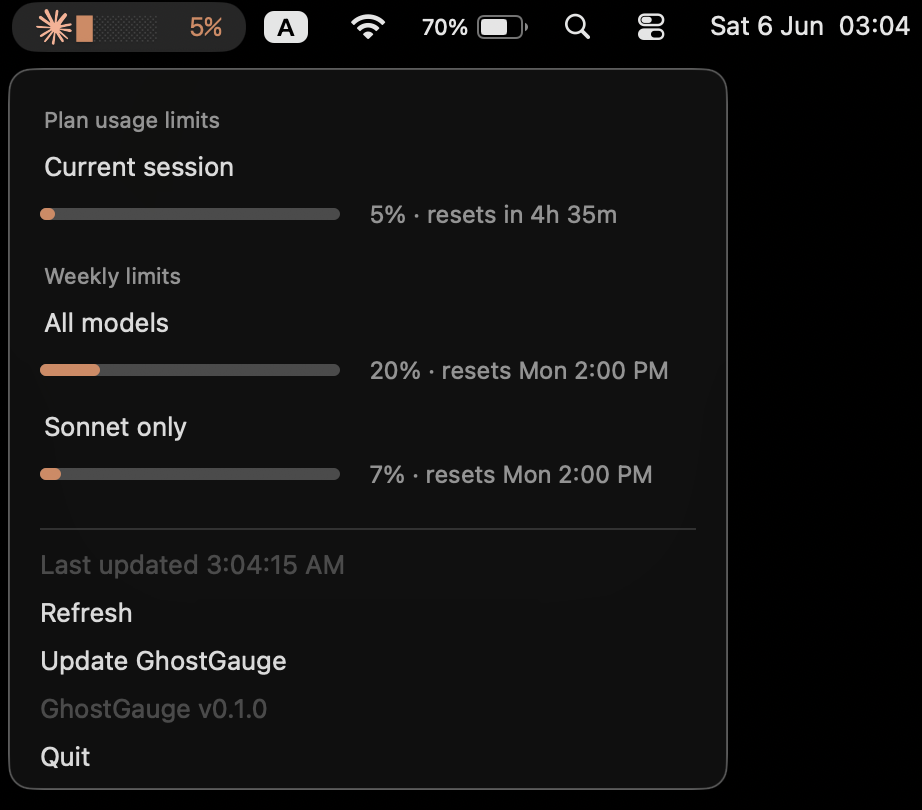
Everything you need to stay inside your limits.
Session window
Your current 5-hour Claude Code session usage shown as a bar and percentage — right in the menubar. Know at a glance how much you have left.
Weekly — all models
7-day usage across all models, with the absolute reset timestamp — with your plan (Pro or Max) shown right in the header. Never get caught off-guard by a reset on a Monday morning.
Per-model windows
Opus and Sonnet 7-day windows surfaced separately when the API provides them — track each model independently instead of a blended total.
Auto-refresh
Polls every 60 seconds and refreshes the moment your Mac wakes. If the API rate-limits, your last numbers stay put while it retries quietly.
Local & private
Reads your token via Apple's built-in security tool, so macOS asks for Keychain access at most once — never on every launch or rebuild. The token is never logged or displayed.
Menubar-native
Lives entirely in the macOS menubar — no Dock icon, no window chrome. Starts at login and stays out of your way until you need it.
Three moves. No magic.
Reads your token from Keychain
GhostGauge reads your Claude Code OAuth access token from the macOS Keychain (service name: Claude Code-credentials) through Apple's built-in security tool — permission is granted once, with no repeated prompts. The token is never displayed, never logged, and never leaves your machine.
Claude Code-credentialsCalls the same endpoint Claude Code uses
Using that token, GhostGauge makes a single authenticated GET request to the Anthropic usage API — the exact same call Claude Code makes internally. Only the returned percentages and reset times are used.
GET https://api.anthropic.com/api/oauth/usageShows usage in your menubar, every 60s
Session (5-hour window) and weekly (7-day window) percentages plus reset times appear directly in your macOS menubar. The app refreshes automatically every 60 seconds in the background.
Built locally — no Gatekeeper prompt,
no Developer account, free.
Because GhostGauge is compiled on your own machine using uv, macOS never quarantines it — no Apple Developer account or code-signing required.
Requires uv to be installed.
Or double-click install.command in Finder — same result.
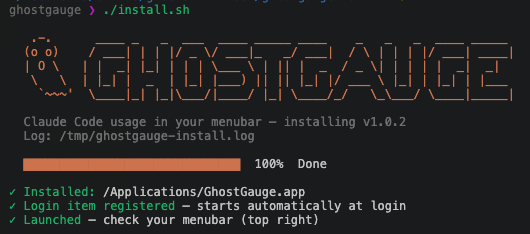
Builds dist/GhostGauge.app, copies it to /Applications, and registers a Login Item — starts automatically at login.
Requires an active Claude Code login (claude) so the Keychain token exists.
The installer shows a live progress bar as it builds. Full build log is written to /tmp/ghostgauge-install.log.
Your token never leaves your machine.
GhostGauge reads your Claude Code OAuth access token via Apple's built-in security tool, so macOS asks for Keychain permission once and never re-asks — not on every launch, not after a rebuild. The plan name shown in the dropdown header (Pro, Max 5x, etc.) comes from those same local credentials and is never transmitted anywhere beyond the single authenticated request to Anthropic's usage endpoint.
Only the returned usage percentages and reset timestamps are stored in memory and shown in your menubar. The token itself is discarded immediately after the API call.
GhostGauge is not code-signed or notarized through Apple. It doesn't need to be — because it's built locally on your own machine by uv, macOS never quarantines it. Gatekeeper is sidestepped entirely, for free, without an Apple Developer account.
The full source is on GitHub. Read it, audit it, fork it.
MIT licensed · open source · no telemetry · no accounts